HomeProductsPricing DemoAboutContact Book a free demo
Pharmacy POS · PharmaDesk

The pharmacy counter, the batch stock and the GST return — in one window.

Pharmacy POS is the desktop billing and back-office system for Indian pharmacies from Graphical Art Studio. The counter searches by name, salt or barcode, picks the batch that expires first and prints a GST invoice in seconds; behind it sit batch-wise stock with expiry alerts, supplier purchases and payables, customer dues, returns and credit notes, GSTR-1 and GSTR-3B built from the same bills, the day book and vouchers, staff attendance and payroll, and automatic daily backups. It runs on the pharmacy's own Windows PC with a local database — no server, no internet needed to bill.

Walkthrough

Four minutes forty-six seconds inside the real software.

Recorded in English from the shipping build, on a working pharmacy's data: signing in as the owner, the dashboard, a bill typed at the counter with three medicines and a cash tender, the sales register and a full tax invoice, batch-wise stock and expiry, purchases and payables, the medicine master with live search, the customer khata, GSTR-1 and GSTR-3B, the sales register report, the day book, HR and payroll, and Backup & Restore. Jump to any chapter below the player.

Why pharmacies choose it

Built like a pharmacy that has to open on a Monday morning.

Every line on a bill is tied to a batch, an expiry and a quantity on hand; every GST figure comes from the posted invoice; and the whole day closes in the same database the counter used. No second set of numbers to reconcile.

Batch-first, not an afterthought

Every line on a bill is tied to a batch, an expiry and a quantity on hand. The counter puts the first-expiry batch on the bill automatically (FEFO) and shows you the alternative batches; stock, expiry alerts, near-expiry reports and valuation all read the same ledger, so the number at the counter is the number in the report.

FEFO Batch ledger Expiry alerts
The GST return is the bill

Tax is stored line by line at the moment of billing — HSN, rate, CGST, SGST, IGST — and GSTR-1 and GSTR-3B are assembled from those posted rows, not retyped from a spreadsheet. Credit notes reduce outward supply, so the shop never files GST on goods a customer brought back.

GSTR-1 GSTR-3B Credit notes netted

Compliance at the counter

Scheduled medicines are flagged from the medicine master; billing one without a prescription opens a pharmacist override that records the reason against the bill. The Schedule-X / narcotic register, insurance and TPA bills and the e-invoice JSON all sit beside the same sales data, so the register and the invoice always agree.

Schedule H Override log Schedule-X register
A day at the counter

Four moves, and the day is billed, stocked, filed and closed.

Open the shop

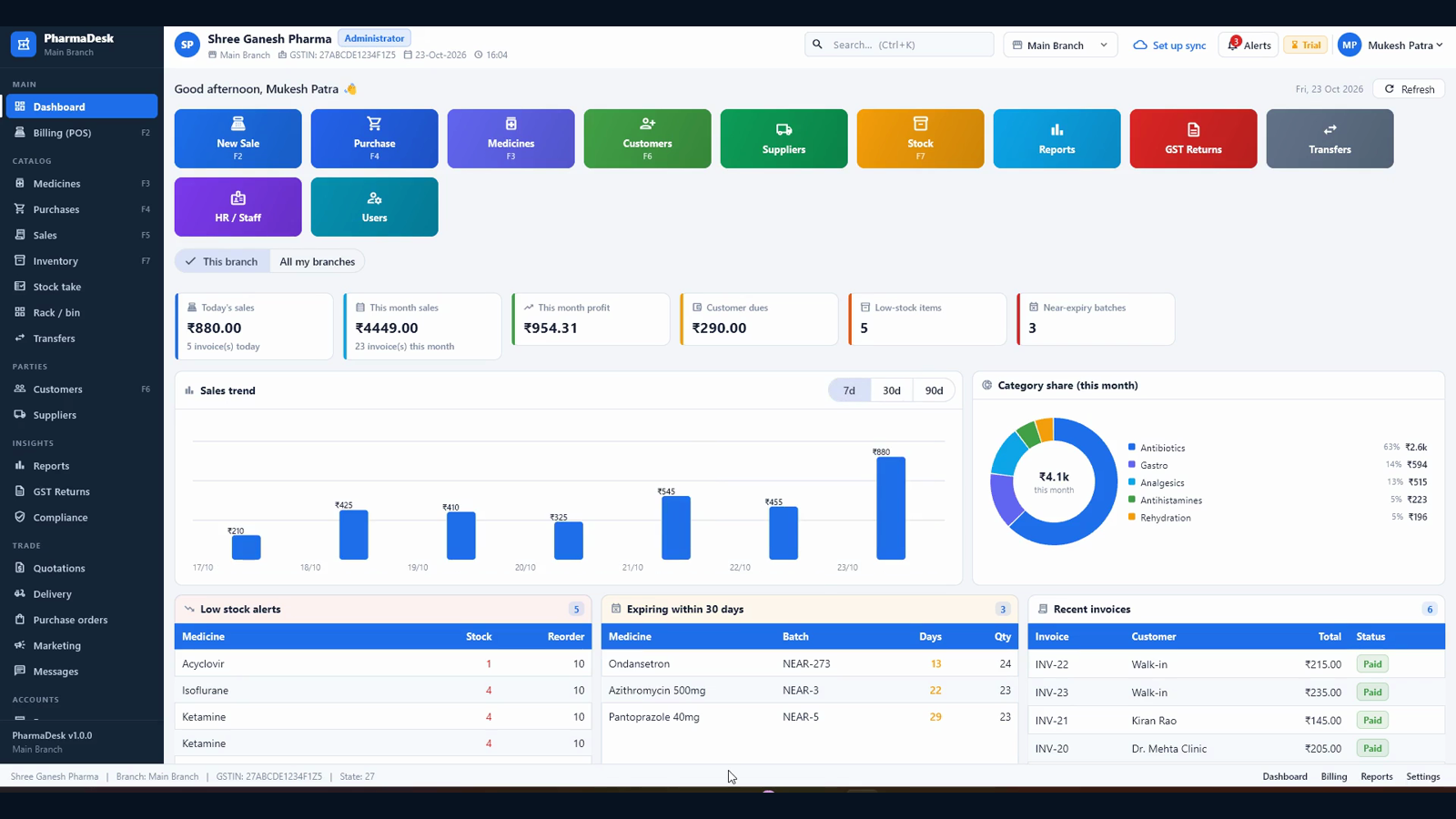
Each person signs in with their own username and role — owner, pharmacist, cashier, accountant or branch manager. The dashboard opens on today's sales, month-to-date revenue, profit, dues, low stock and near-expiry batches.

Bill and tender

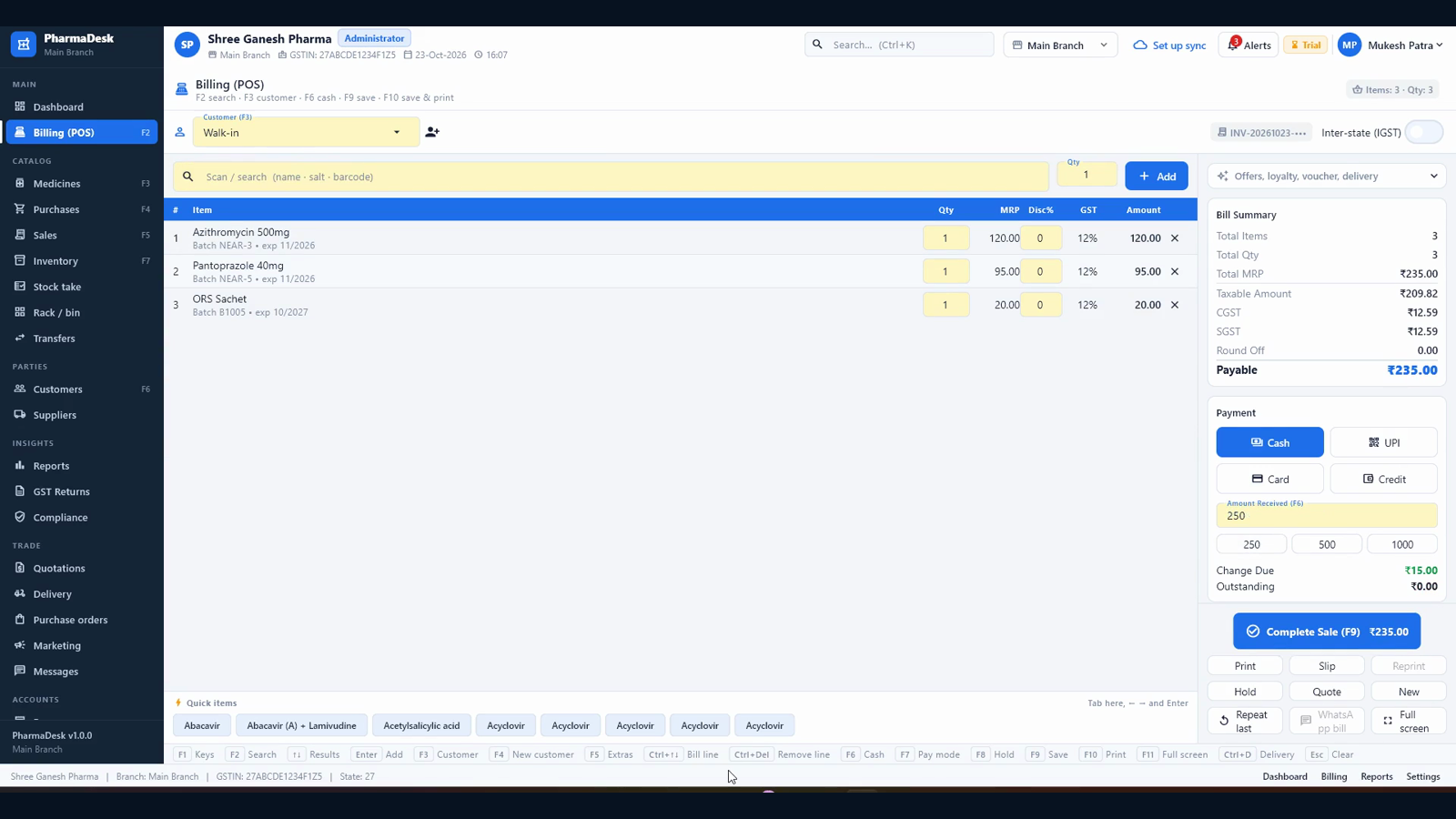
Type a few letters of the name or salt, or scan the barcode; the counter suggests the first-expiry batch and Enter puts it on the bill. Cash, UPI, card or credit — with change due and outstanding on screen.

Receive the stock

A supplier bill becomes a GRN with batch, expiry and free quantity; stock and payables update together. Purchase orders, purchase returns and debit notes follow the same path, and every movement is on the ledger.

File and close

Returns pull up the original bill and post a credit note. The day book reconciles cash, UPI and card, GSTR-1 and GSTR-3B are ready from the same bills, and the daily backup runs by itself.

Everything in the box

The whole pharmacy, screen by screen.

Billing (POS)

  • Search by name, salt or barcode; Enter puts the highlighted medicine on the bill
  • FEFO batch picking with a batch panel — expiry and stock are visible before you choose
  • Rate, quantity, discount and GST editable per line; bill-level round-off
  • Cash, UPI, card or credit, with amount received, change due and outstanding shown live
  • Offer, loyalty points, voucher and delivery options on the same screen
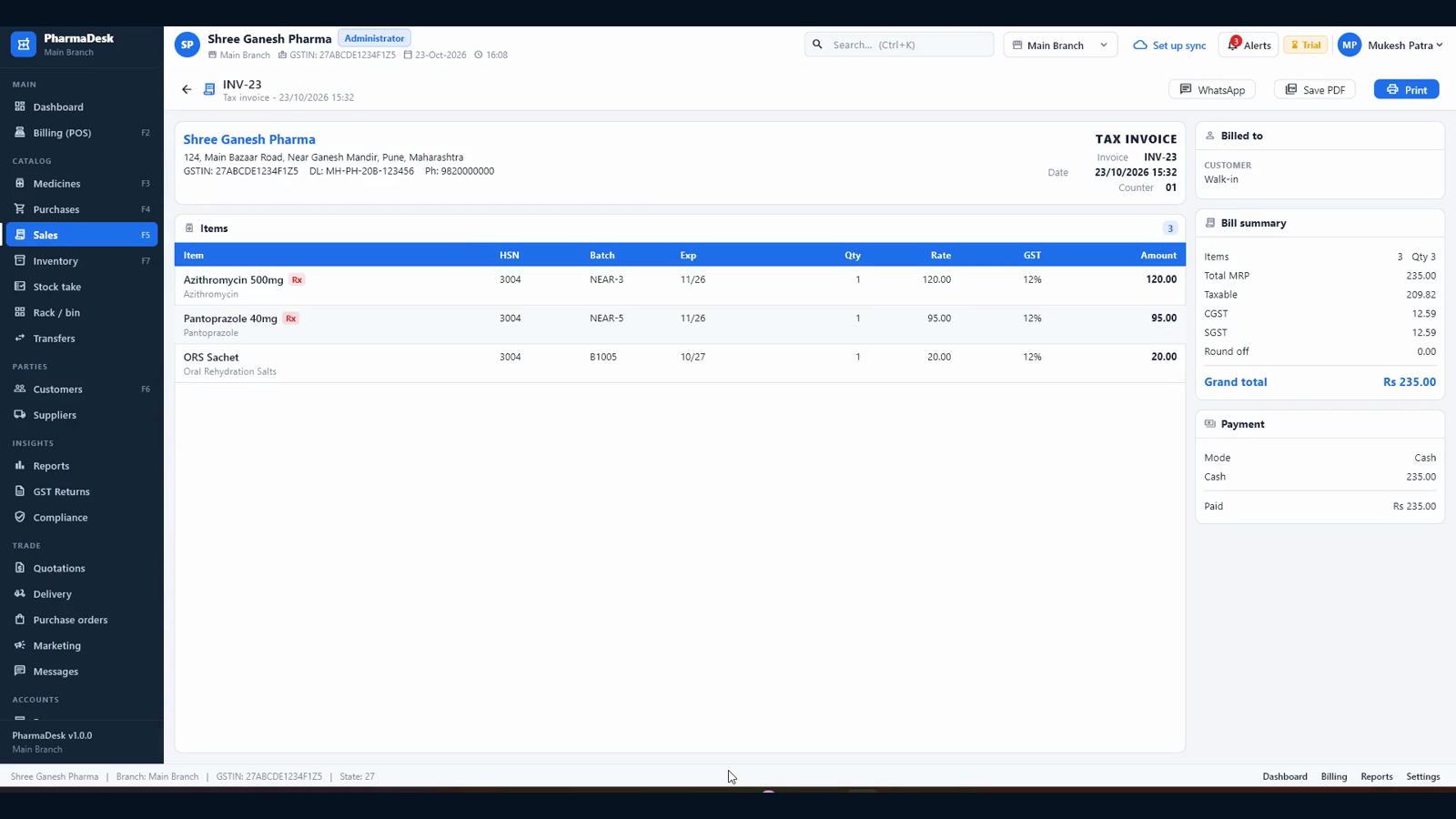
  • F9 saves; the invoice is on screen and ready to print or save as PDF
F2 / F9 Barcode FEFO Rx override

Batch & expiry stock

  • Batch-wise stock with expiry, MRP and purchase rate; stock value at cost
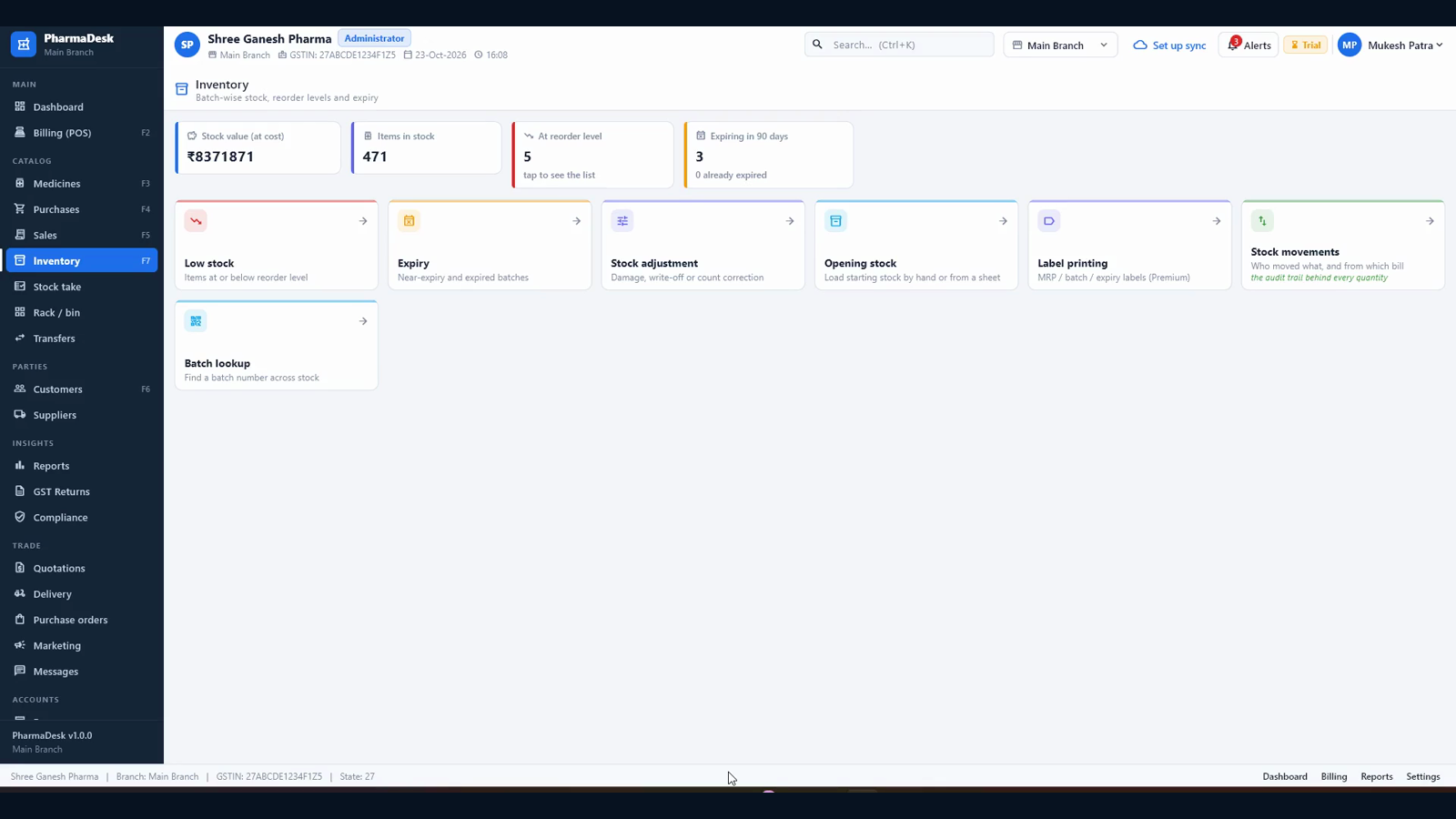
  • Low-stock and near-expiry lists on the dashboard, with a 90-day expiry view
  • Opening stock, stock adjustment, stock take and rack / bin locations
  • Every quantity change is a movement row — purchase, sale, return, transfer — traced back to its document
  • Batch lookup across the catalog and label printing for shelves
Batches Expiry Movement ledger

Purchases & payables

  • Purchase orders and goods-received notes with batch, expiry and free quantity
  • Supplier invoice, taxable value and GST split stored per purchase line
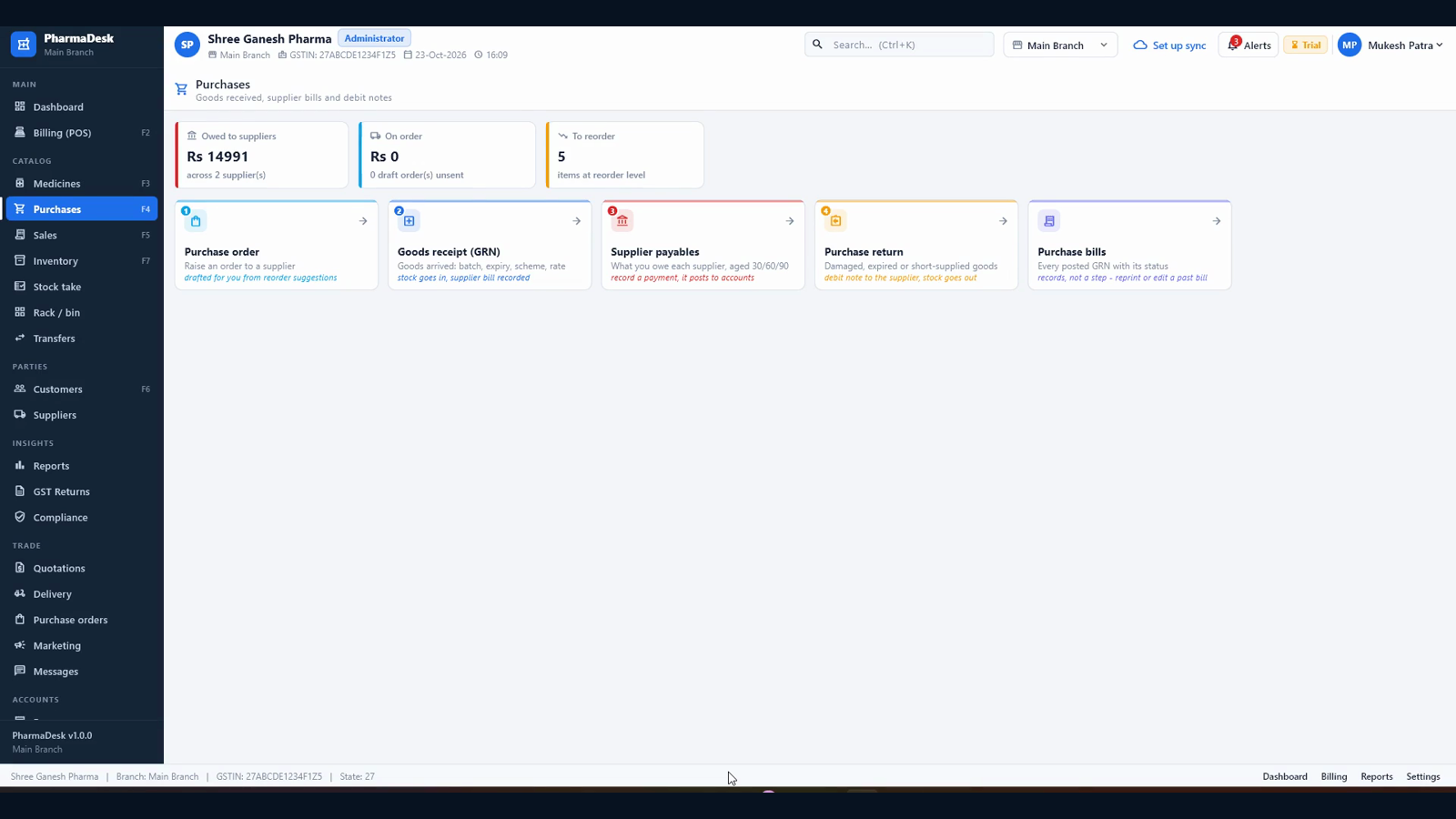
  • Supplier payables aged 30 / 60 / 90 days, with payments recorded against bills
  • Purchase returns and debit notes put the stock out and reduce the payable
  • Every posted purchase is reprintable from the purchase bills list
GRN Payables Debit notes

Sales, returns & dues

  • Every invoice with date, customer, total and paid / credit status
  • Return from the original bill: goods go back to their batch and stock is restored
  • Credit note settled as a cash refund, adjusted against the bill or held as an advance
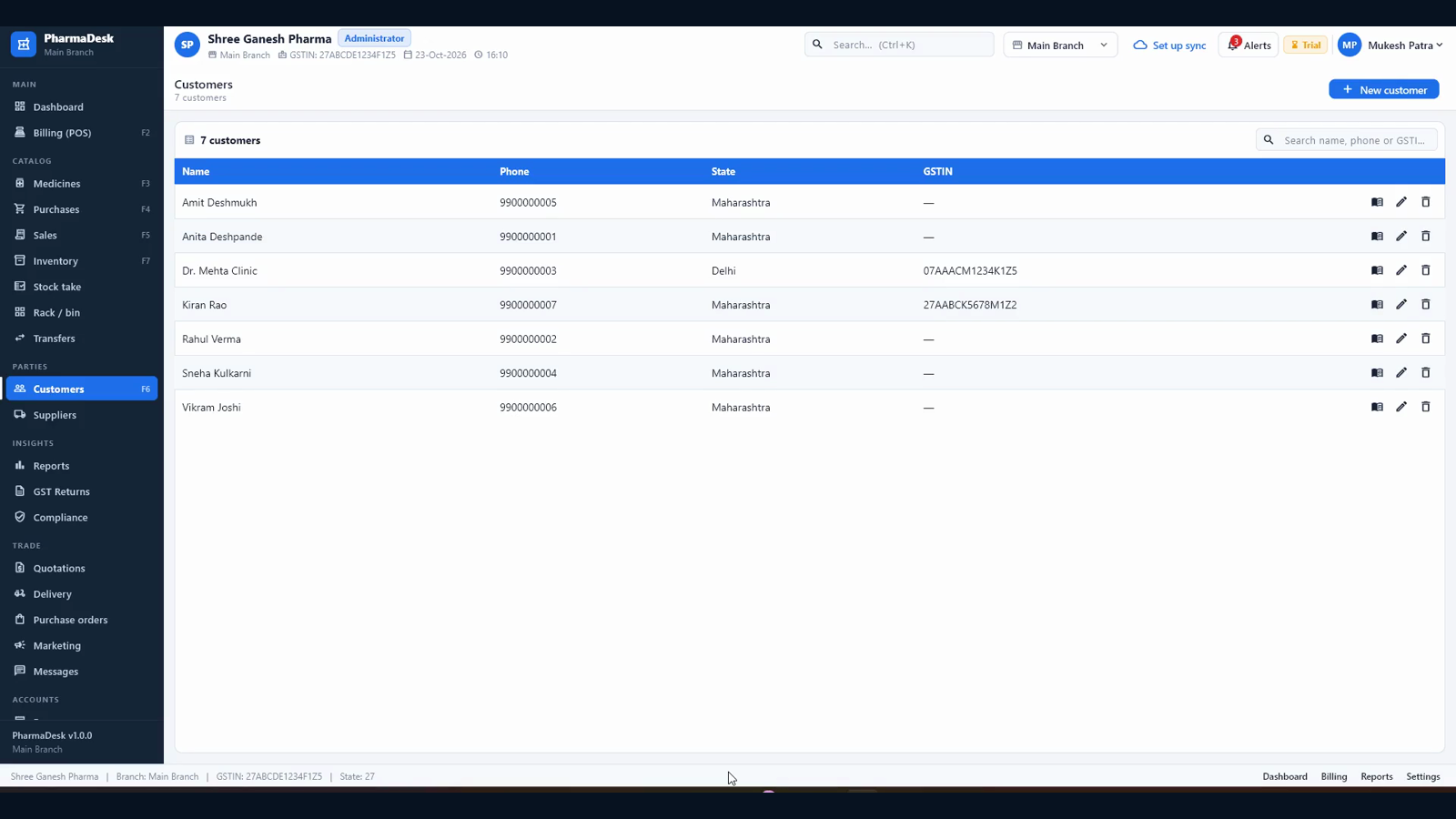
  • Customer dues with ageing and a khata view for each customer
  • Delivery queue for bills that go out; quotations for clinic and corporate orders
Credit notes Dues Delivery

Medicine master & import

  • Name, salt, company, category, HSN and GST slab; schedule, pack and units per pack
  • MRP, rack, shelf, barcode and reorder level per medicine
  • Bulk import of a whole catalog from CSV or Excel, with a dry-run preview and duplicate handling
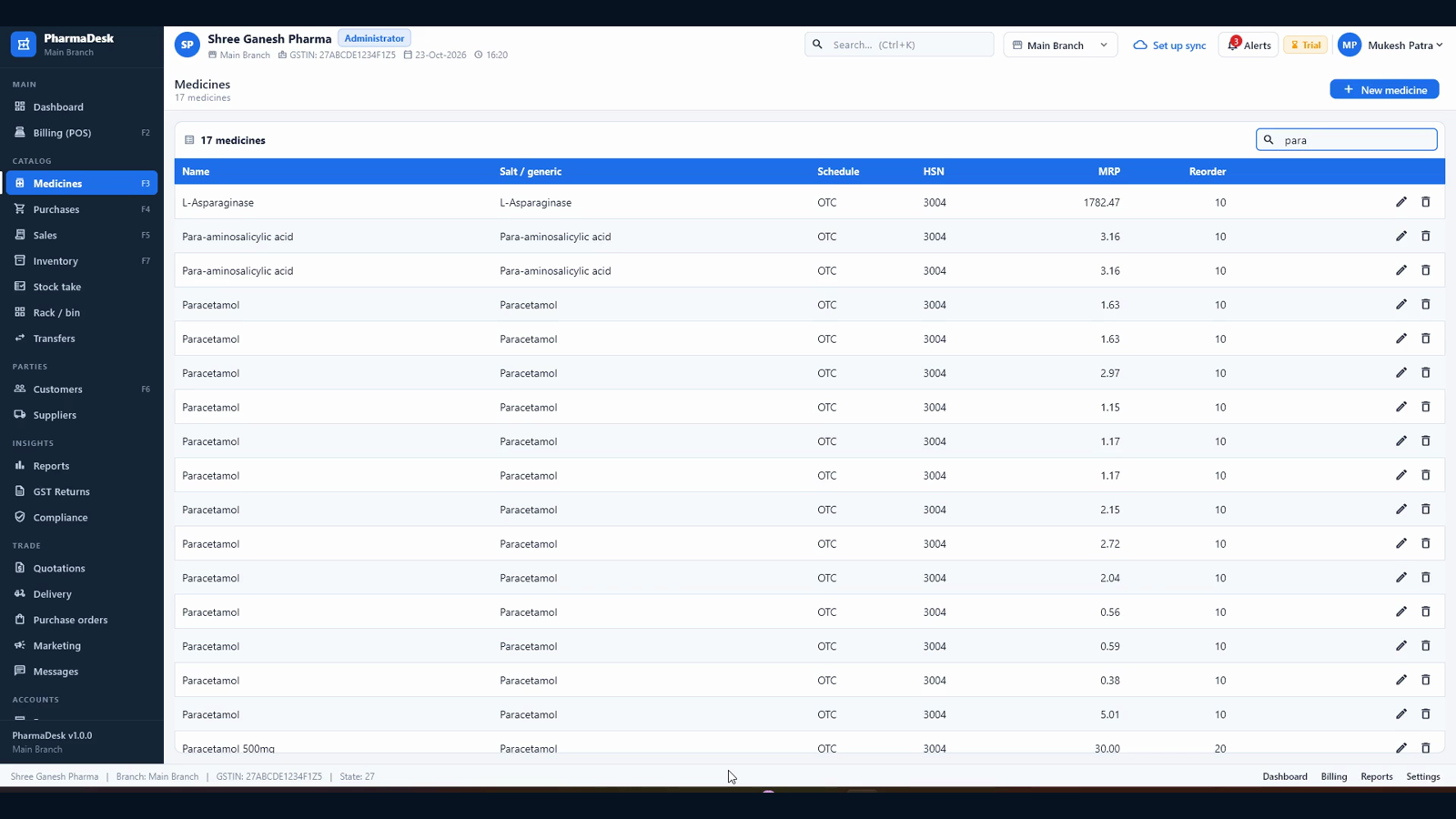
  • Search in the list and in the counter's quick-item bar, with a live result count
  • Edit and delete are role-gated and audited
CSV / Excel import HSN Salt search

GST returns

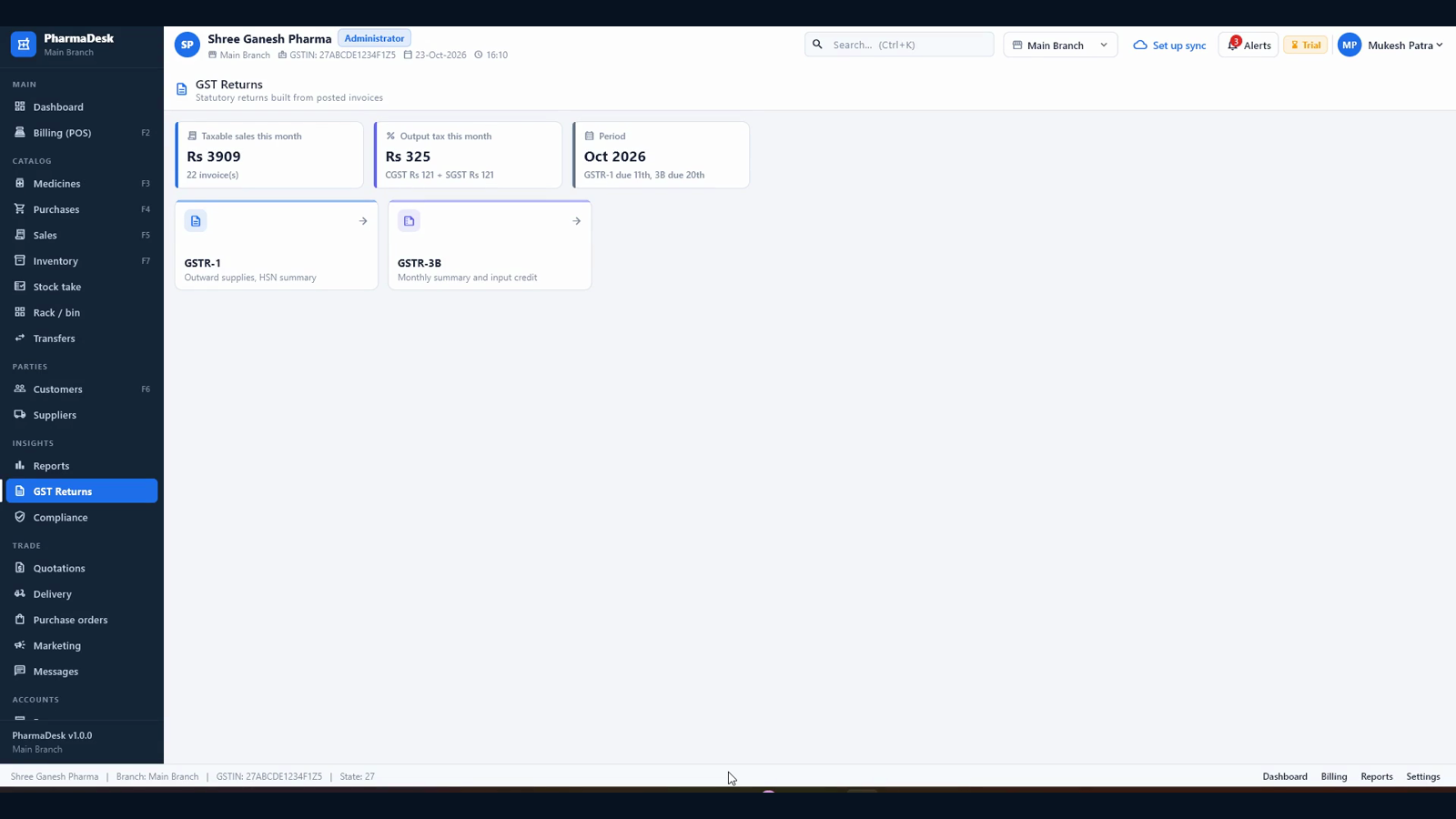
  • GSTR-1 with B2B, B2CL, B2CS, HSN summary and the document range
  • GSTR-3B with outward supply, credit notes and input tax credit from purchases minus returns
  • Validation flags for blank HSN and unmapped place of supply before you export
  • Period and branch scoped; the figures come from posted invoices, not a parallel sheet
  • Export the filing papers; your accountant files them on the portal
GSTR-1 GSTR-3B Period scoped

Reports & exports

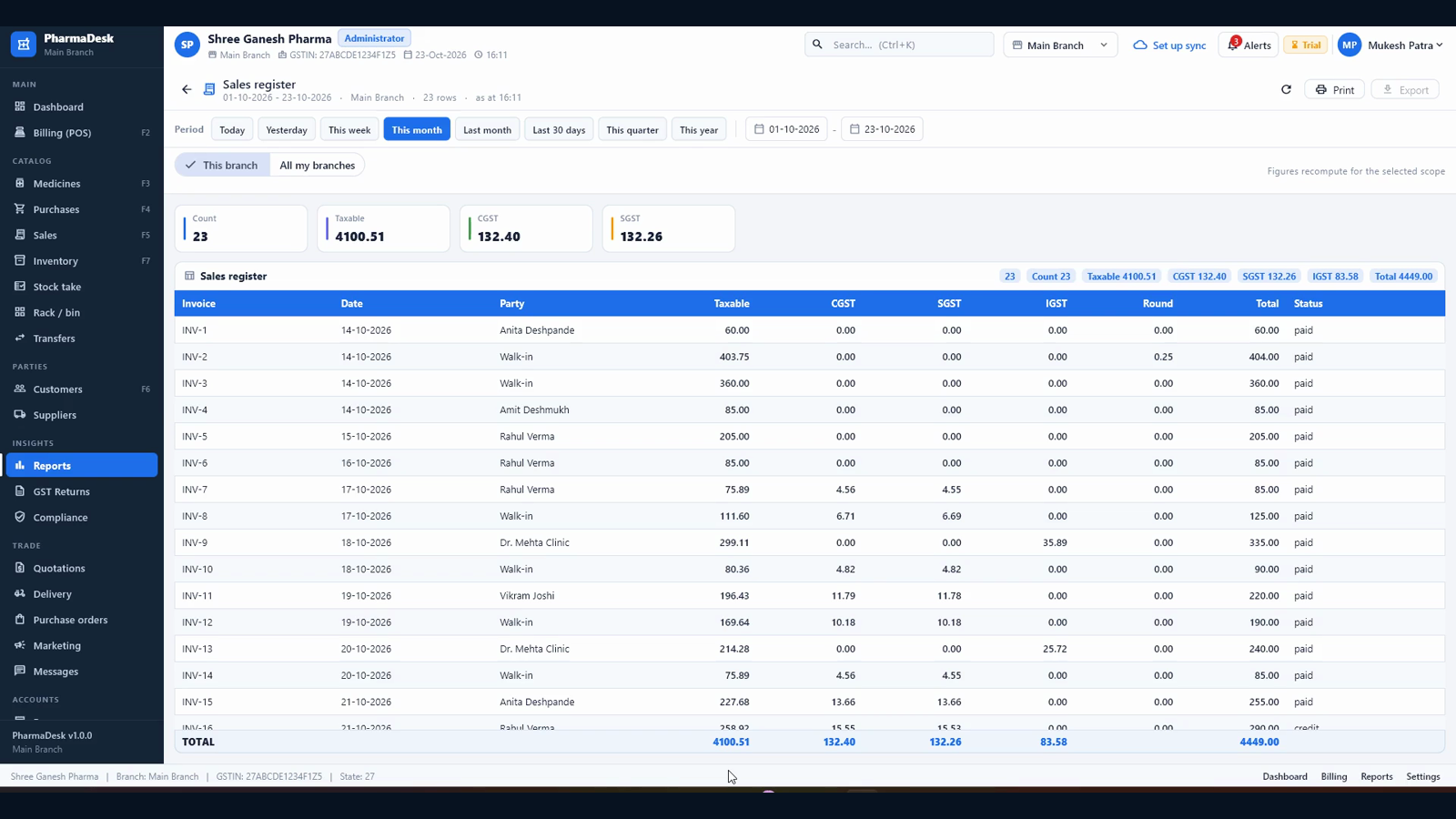
  • Sales register, purchase register, stock on hand and valuation
  • Expiry and near-expiry, low stock, non-moving items
  • Profit / margin, customer outstanding, supplier purchase summary
  • Doctor-wise sales, refill due and item-wise sales
  • Every report prints, exports to CSV or PDF, and honours the branch scope
12 reports CSV / PDF Print

Accounting & day book

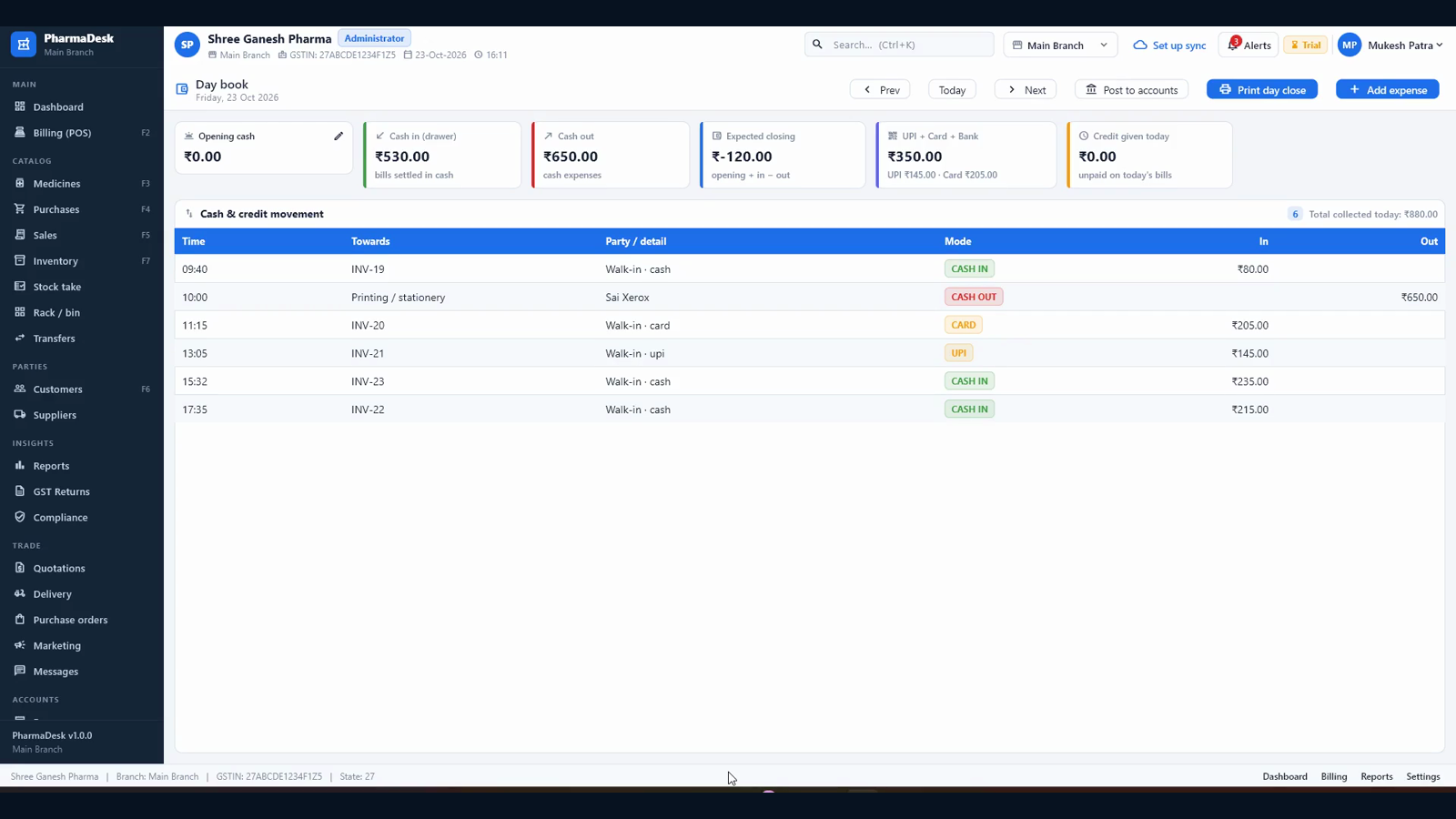
  • Day book with opening cash, cash in / out, expected closing, UPI and card totals
  • Every sale, purchase, expense and return posts to the ledger automatically
  • Vouchers, cash book, bank book, trial balance and profit & loss
  • Expenses with category, payee, amount and payment mode
  • Day-sales posting is idempotent — posting twice cannot double the books
Day book Vouchers Trial balance

HR & payroll

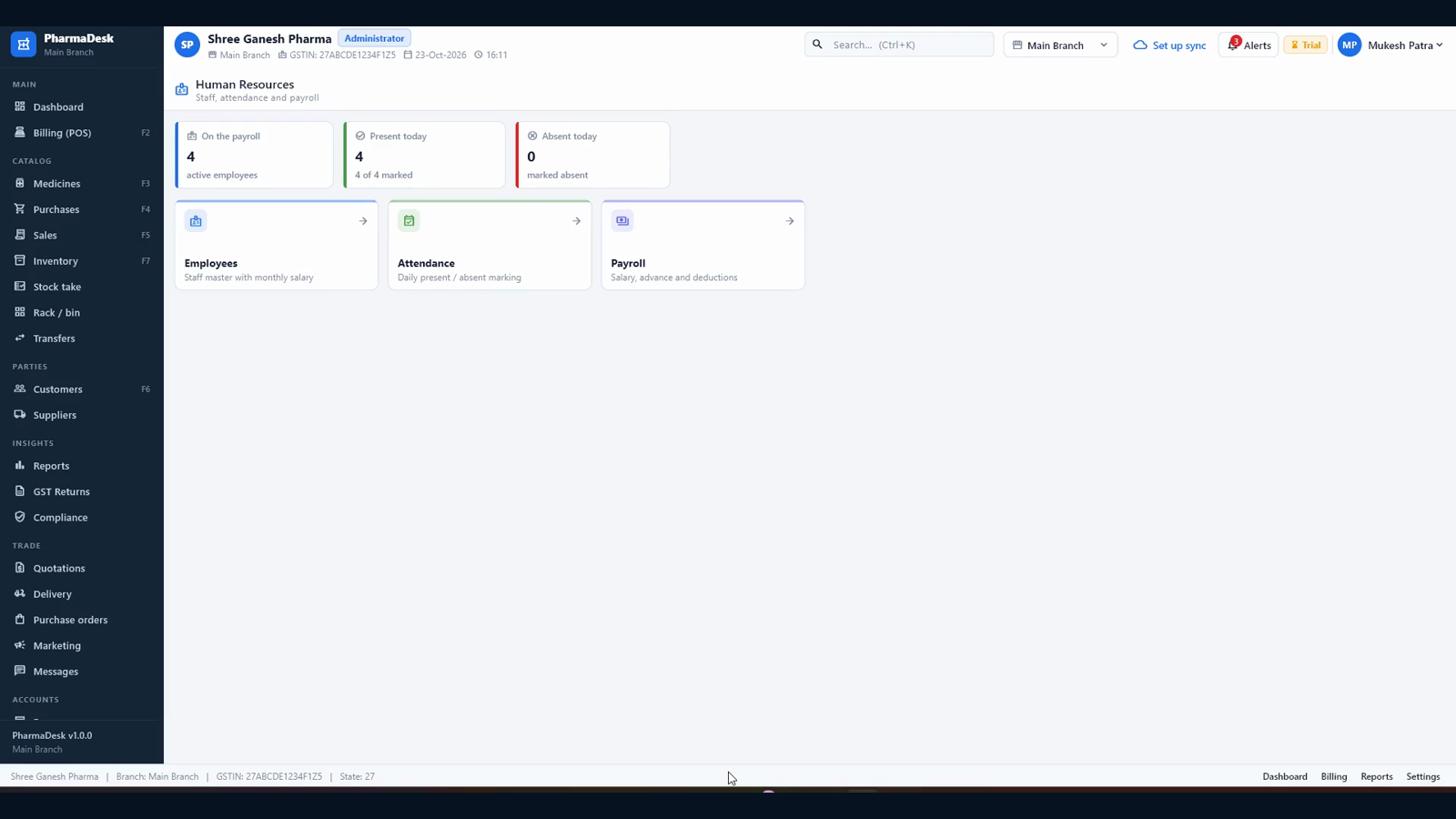
  • Staff master with designation, monthly salary and joining date
  • Daily attendance — present, absent, half day — with a one-touch register
  • Salary payments, advances and bonuses recorded per employee and period
  • Payroll history stays beside the accounts, not in a separate diary
Attendance Salary Advances

Branches & transfers

  • Multiple branches with their own GSTIN and state
  • Stock transfers with batch, quantity sent and quantity received
  • Transfer requests from another branch, fulfilled with one click
  • Every screen can be scoped to one branch or all branches
  • Optional cloud sync keeps counters and branches on the same books
Multi-branch Transfer requests Branch scope

Backup & restore

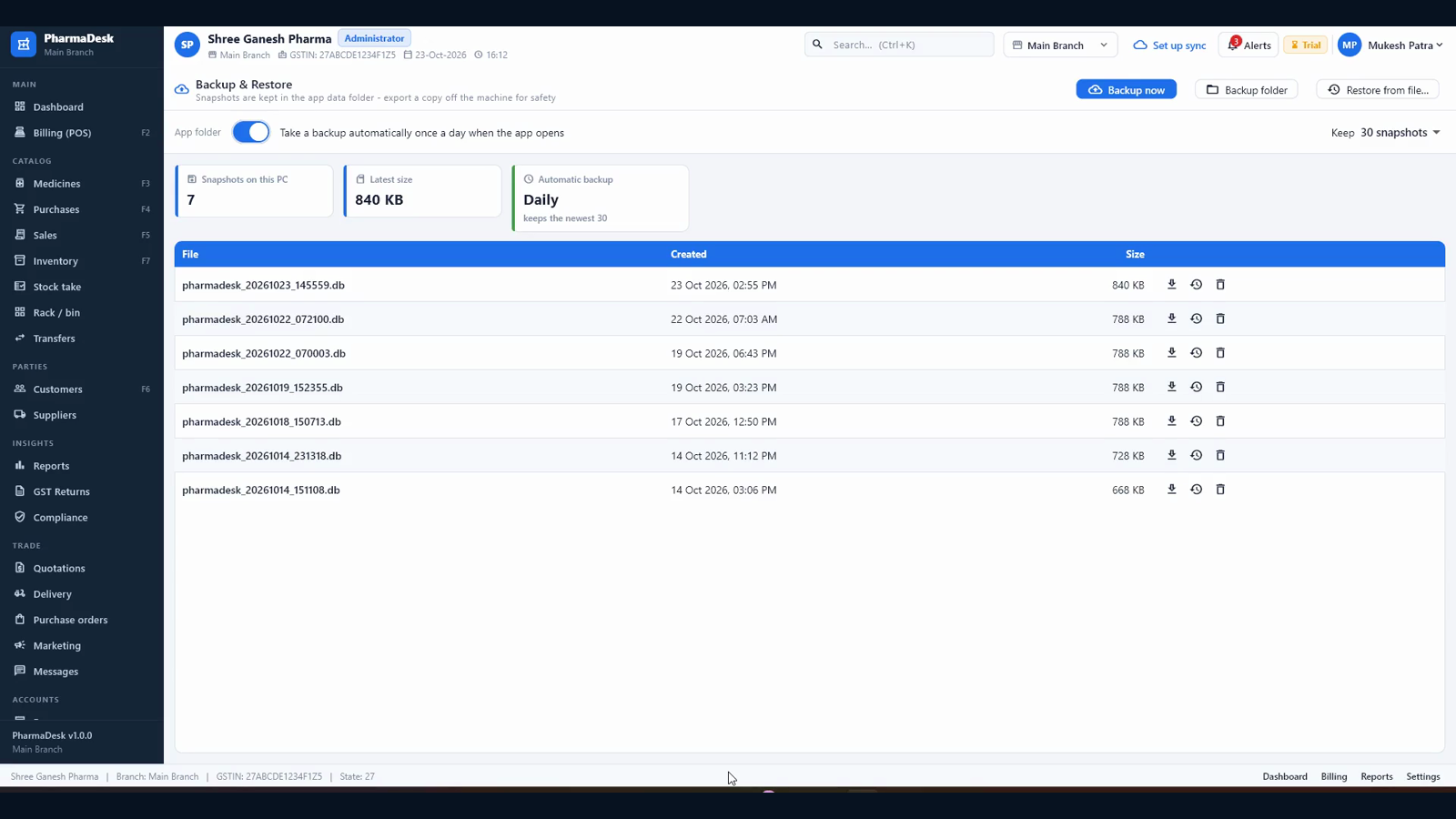
  • Automatic backup once a day when the app opens; the newest 30 snapshots are kept
  • One-click backup now, with the folder and file size shown
  • Restore from a file at the next launch, keeping the previous database as a safety copy
  • Backups are validated before they replace anything
  • Optional encrypted cloud copy and owner remote view
Daily 30 kept Restore

Users, roles & audit

  • Owner, pharmacist, cashier, accountant and branch-manager roles
  • Passwords stored as Argon2id hashes, never in the clear and never synced
  • Only an owner can create another owner; passwords are enforced at eight characters
  • Audit log of sign-ins, edits, exports, returns and settings changes
  • Per-user interface: each role sees only the screens and actions it may use
5 roles Argon2id Audit log
Screenshots

Every picture here is the real software.

No mock-ups — these are screens from a working pharmacy database, captured from the same build the walkthrough was recorded on.

Dashboard with today's sales, month-to-date revenue, profit, dues, low stock and near-expiry batches
Dashboard — the day at a glance
Billing counter with three medicines, batch and expiry per line, GST summary and cash tender
Billing — batch by batch, with GST
GST tax invoice with shop GSTIN, drug licence, HSN, batch, expiry and payment
Tax invoice — GSTIN, HSN, batch, expiry
Inventory hub with stock value, items in stock, reorder level and expiry tiles
Inventory — stock value, reorder, expiry
Purchase hub with supplier payables, on-order value and reorder items
Purchases — payables and reorder
Medicine list filtered to para, showing name, salt, schedule, HSN, MRP and reorder level
Medicine master — salt and name search
Customer list with phone, state and GSTIN
Customers — khata and GSTIN
GST returns hub with taxable sales, output tax and GSTR-1 / GSTR-3B tiles
GST returns — GSTR-1 and GSTR-3B
Sales register with invoice, date, party, taxable value, CGST, SGST, IGST and totals
Sales register — tax split and totals
Day book with opening cash, cash in and out, expected closing, UPI and card totals
Day book — cash, UPI, card
HR hub with staff on payroll, present today and absent today
HR — attendance and payroll
Backup and Restore with daily automatic backup and snapshots
Backup & restore — daily snapshots
Running it

A Windows PC and a folder — that is the whole stack.

No SQL Server, no server room, no network share required: the database lives in the app's own data folder and the built-in backup copies it daily.

What it runs on

A Windows 10 or 11 desktop or laptop, with the database in the app's own data folder — no SQL Server and no server to maintain. Barcode scanners work as keyboards, and printing goes through the Windows drivers you already have: A4 for the tax invoice, PDF when you want to send the bill instead of print it.

Windows 10 / 11 Local database Barcode + A4

Setting it up

The first run opens a setup screen: shop name, GSTIN, drug licence, address, state and the owner's sign-in. Then load the catalog — CSV or Excel with a dry-run preview and duplicate handling — and the counter is ready. Branches, users and printers are all set from inside the app, with setup included in the licence.

Guided first run CSV / Excel import Setup included

Keeping it current

The licence activates once and is checked offline afterwards, so a shop with no internet still bills all day. Updates arrive as signed packages and the app takes a backup before it touches the database. An optional cloud sync keeps other counters and branches on the same books, and gives the owner a remote view — the shop works without it.

Offline licence check Signed updates Optional cloud sync
Trial & licensing

Try the whole product, then licence it per shop.

The download runs as a full-feature trial before a key is entered — every screen, every report, every module.

Fourteen days, everything on

The download runs as a full-feature trial before a key is entered — every screen, every report. It is enough to bill real days, file a real GST return and show the accountant before you decide.

No key needed All features

Activate when you are sure

A licence key is signed and bound to the shop's install, validated offline. Plans run from a single counter to a multi-branch chain, with the number of branches, counters and users written into the licence. Renewing extends the date without touching your data.

Signed key Offline check Renewals

Priced per shop, not per seat

Pricing depends on the counters, branches and modules you take — billing alone, or the whole back office with accounts, HR and payroll. Tell us how the pharmacy runs today and we will quote for it; setup with your catalog, tax rates and printer is part of the job.

Setup included Support by WhatsApp

No public price list, because a single-counter pharmacy and a multi-branch chain with payroll are not the same product. Call or WhatsApp +91 98309 49024 and we will quote in the same conversation.

Who makes it

Built and supported by Graphical Art Studio.

Pharmacy POS — PharmaDesk 0.1

Pharmacy POS is built by Graphical Art Studio — a business-software studio in Kolkata making software for hotels, restaurants, repair shops, retail counters and pharmacies. It is a Windows desktop product with a local database, developed and supported by Mukesh Patra.

Windows desktop Local database GST-ready Offline-first
Pharmacy POS questions

Before you ask.

No. Billing, stock, purchasing, GST and every report run on the pharmacy's own PC with a local database, with the line down. Internet is needed only to activate or renew the licence, to pull an update, and for the optional cloud sync and owner remote view.

Windows 10 or 11 — an ordinary desktop or laptop. There is no SQL Server to install and no server to keep running: the database lives in the app's own data folder, and the built-in backup copies it daily. Barcode scanners work as keyboards, and printing uses the Windows printer drivers.

Yes, by default — a pharmacy bill is not complete without them. Every medicine line is tied to a batch, an expiry date and the quantity on hand. The counter picks the first-expiry batch automatically (FEFO) and shows the other batches, and the dashboard and inventory pages report low stock and what expires in the next ninety days.

The medicine master carries the schedule. Billing a scheduled item without a prescription opens a pharmacist override with a mandatory reason, which is recorded against the bill. The Schedule-X / narcotic register and insurance / TPA bills read the same sales data, so the register and the invoice agree.

The filing papers, not the portal login. GST is stored per invoice line — HSN, rate, CGST, SGST, IGST — and GSTR-1 (B2B, B2CL, B2CS, HSN, document range) and GSTR-3B (outward supply, credit notes, input tax credit) are assembled from those posted rows. Your accountant exports and files them on the portal.

Yes, with the optional cloud sync. Branches have their own GSTIN and state, stock transfers and transfer requests move goods between them, and every screen can be scoped to one branch or all branches. Without cloud sync the app is a complete single-counter system — the shop is never blocked on a network.

Automatically, once a day when the app opens, keeping the newest thirty snapshots; you can also take one with a single click. Restore reads a backup file at the next launch, keeps the previous database as a safety copy, and validates the file before replacing anything.

Yes — fourteen days with every feature on, no key needed. It is enough to bill real days, file a real GST return and show the accountant before you decide.

Next step

See it on your own medicines

Send a few of your product lines and we will walk you through billing, batch stock and the GST reports on your own data.